
A lot of franchisors still picture HubSpot as the email and marketing automation tool it was in 2010. That was sixteen years ago.
Today HubSpot is a flexible, powerful Customer Platform that, with some franchise-specific tuning, can serve nearly every team on the franchisor side of the business. It is the CRM your marketing, sales, development, real estate, and field support teams can all work from, on one platform.
A lot of software built for franchisors has not kept pace with technology. They don’t integrate with modern systems, they’re building on old tech, they barely support automation, and they’re certainly not ready for the AI era. HubSpot replaces that clunky, creaky, sprawl with one connected system that’s powerful, flexible, and easy for teams to use. One system that can house the entire Lead to Owner journey.
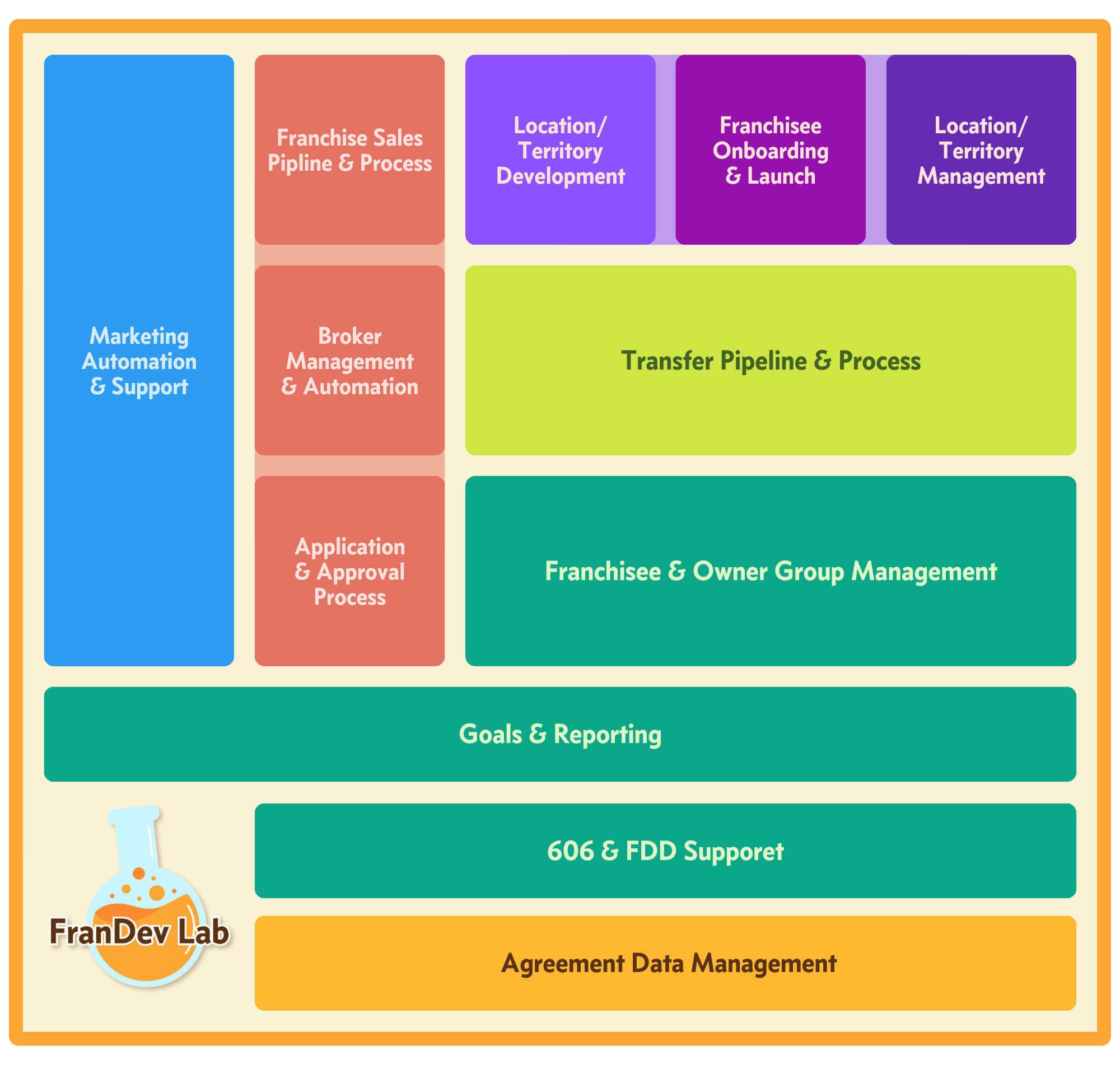
Let's look at what HubSpot can do for each team involved in Franchise Development.
HubSpot for Franchise Marketing Teams
Attract, convert, and nurture franchise leads. Track and report on lead-gen efforts by vendor, campaign, and source. Host your site, blog, and forms on one unified platform. For a franchise marketing team, HubSpot can run the entire top of the funnel, every channel, every source, in one place.
Attract & Convert Leads
At most Brands, inquiries land wherever the channel drops them: your website form in your CRM, Broker Leads from email, Portals via email, Social Ads from your vendors…its a mess and most franchisors struggle to attribute those leads.
Here’s how it should work: a prospect sees your franchise ad. They click to your site and submit an inquiry form on a landing page. HubSpot creates a Contact with the full source trail attached. Another prospect sees an ad on social and submits a lead form in their feed. The integration drops that Contact into the same system. Someone chatting with AI lands on your home page and submits your form. However a Candidate first raises their hand, they land in one place, tagged with where they came from.
- Connect Your Ad Accounts. Google, Meta, LinkedIn, and TikTok ad accounts can all connect to HubSpot. This brings in cost data, ad interactions, and lead form conversions depending on the platform. Conversion forms in those channels can automatically create HubSpot Contacts. Each platform can also receive a Contact's progress back (using Lifecycle Stage) to improve targeting.
- Use Forms to Convert. One or two forms is usually all a franchise development site needs: contact details plus the fit data your lead scoring runs on, like net worth range, timeline, and territory of interest, but consider asking questions that would help your Reps: motivation, why they’re interested in your brand in particular. Use shortened or multi-step forms to right-size the ask to the offer. HubSpot’s native Form Builder means no plugins or integration hassles.
- Build Landing Pages for Campaigns. Use dedicated landing pages for targeted campaigns. Each page carries one offer and one form. The research and conversion path stays focused for your prospects.
- Use CTAs Across Your Site. HubSpot can centralize your CTAs instead of manually updating buttons any time there’s a change. A "See if [Brand] is right for you" button that leads to a self-assessment gives every page a next step, with unified language and destinations and tracking on every click. Smart CTAs can adapt to the visitor based on data like Lifecycle Stage, so a first-time visitor and a returning Candidate see different prompts and you get visibility into views, clicks, and submissions on each one.
Respond in Minutes, Not Hours
A Candidate submits an inquiry form on a Tuesday night, and at most Brands nothing happens until someone works the inbox the next day…or maybe later that week. The industry data is brutal: 35% of franchise brands never respond to inquiries at all, the average email response takes 8.8 hours, and only about 13% of brands make first contact within 30 minutes. You should treat your Speed to Lead as a system, not a Rep's habit. The moment a Candidate raises their hand, HubSpot can assign them, contact them, and notify your team.
- Route Every Lead the Moment It Lands. Use Workflows to assign each new Contact to a Setter or Franchise Sales Rep instantly, with rotation to spread leads across the team.
- Automate the First Touch. Fire an immediate email from the assigned Rep the moment the form is submitted, with a booking link inside it. A qualified Candidate can put themselves on your Rep's calendar before another brand has even opened the inbox.
- Put SMS in the First-Response Motion. 73% of franchise brands never text Candidates at all, which makes SMS the emptiest channel in franchise development. Use HubSpot's SMS tools or an integrated platform like JustCall send a compliant, immediate text acknowledging the inquiry and carrying the same booking link, with every message logged on the Contact.
Bring In Broker and Portal Leads
Broker referrals and portal inquiries make up a large share of Candidates, and most of those leads arrive still (in 2026!) arrive as emails someone has to spot and enter in the CRM. You should give every lead source a path into HubSpot at the moment the lead exists, so the speed-to-lead motion above applies to all of them, not just the ones who found your form.
- Capture Portal Leads Automatically. Inquiries from franchise portals like Franchise Gator or Franchise Direct can flow into HubSpot through a native integration, lead-email parsing, or a Zapier connection. The Contact is created with the Vendor and Source stamped at intake, and your routing and first-touch automations fire the same as they would for a form fill.
- Intake Broker Referrals Into the CRM. A Broker referral shouldn't live in a Rep's inbox. Broker leads are created by lead-email parsing, or by your Reps directly when they work one-on-one with a Broker. Either way, the Contact is associated to the referring Broker's Contact and the Broker Network's Company record at creation, so attribution runs on associations, not memory. (Broker attribution and performance reporting are covered in the Sales section.)
- Stamp the Source at the Door. However a lead arrives, its attribution is set the moment the record is created: Vendor, Source, and Campaign for marketing and portal leads, Broker and Network associations for Broker leads. Clear attribution data gives you clear visibility into performance of your sources.
Nurture Leads to Hand-Raisers
However ready a candidate might be when they submit your inquiry form, they could use some information and excitement about their journey, about your Brand, about your process. Nurturing plays help pre-inquiry conversions like fit assessment or lead magnets drive to becoming hand-raisers. They also help keep your leads engaged throughout the diligence process.
- Book Qualified Prospects Instantly. When a Candidate qualifies, use an automation to encourage them to book an Intro call immediately while scheduling outreach for your Setters or Directors.
- Nurture by Readiness and Timing. For prospects who are interested but not ready, use email workflows to deliver targeted content that supports their self-guided research and tells your Brand's story, without your Franchise Sales Reps chasing Contacts who have told you their timing isn't right yet.
- Run a "Not Yet" Track. Set up separate automations for visitors who don't meet your net worth or liquid capital requirements yet. Keep them in a long-term nurture motion so you can re-engage them when their financial picture changes and identify Candidates who are close to the threshold.
Report on Marketing Outcomes
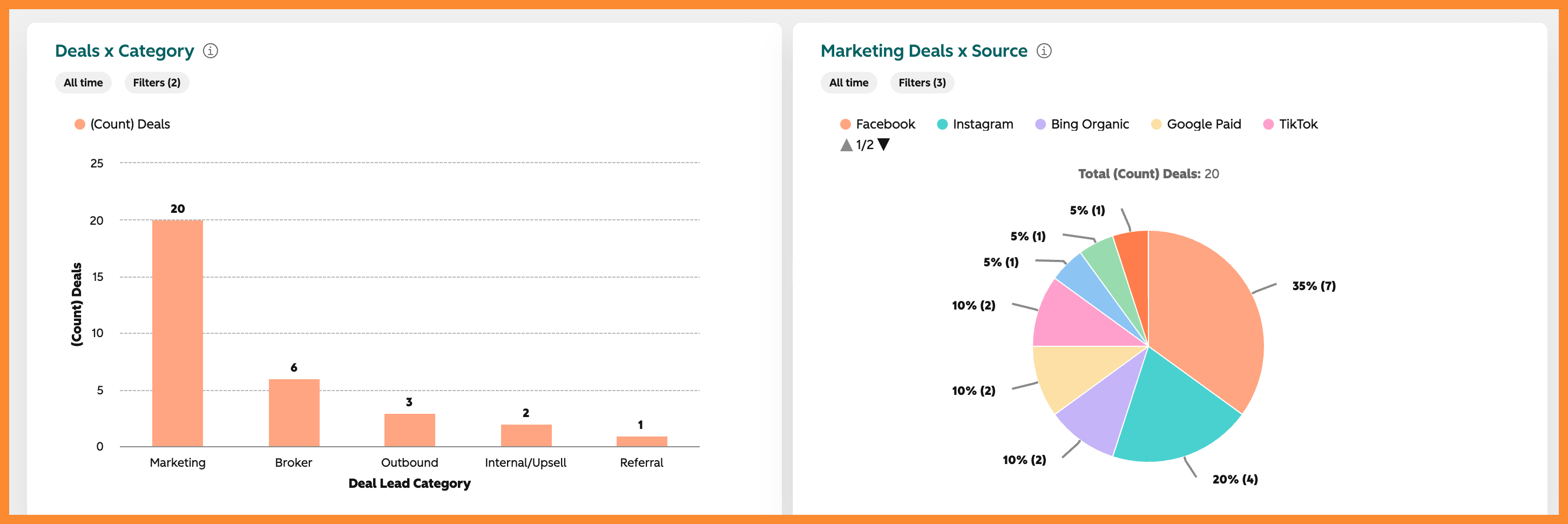
Brands should own their marketing reporting. You should be able to answer "which Broker, portal, or campaign actually produces awarded Franchisees". Not just which produced clicks or Contacts. Or which Broker claims they did. Every touch is logged to the Contact and the Deal. You can see which sources drive inquiries and which ones produce awarded Franchisees.
- Track by Vendor, Source, and Campaign. Use Custom Properties on Contacts and Deals to log the Vendor, the Source (like Google Ads, Owned Content, or Social Media), and the Ad Campaign behind each prospect. Capture the initial touchpoint and the touchpoints that follow. That gives you the full picture of the activities that engage a prospect, not just the first click. This is critical for retargeting and reactivation of old leads.
- Build Custom Reports. Turn that data into insight about your marketing outcomes. Show Leads created by Vendor and by Source for a reporting period and over time. Track Leads per week or Qualified Leads by Source. Now you can see what is actually working and where to spend next.
What runs it:
| Capability | Hub / Feature |
|---|---|
| Ad accounts + retargeting | Marketing Hub |
| Landing pages, forms, CTAs | Marketing Hub |
| Lead routing & rotation | Any Pro+ |
| Immediate first-touch email | Marketing Hub Pro+ |
| SMS messaging | Marketing SMS Add-on or SMS/Call Provider |
| Email nurture & workflows | Marketing Hub Pro+ |
| Custom reports & dashboards | Marketing Hub |
| Meeting scheduling | Sales Hub Pro |
Host Your Franchise Marketing and Development Site
Your franchise marketing and development site can be a WordPress site and theme, but it doesn't need to be. Content Hub can host your site with a built-in drag-and-drop editor to make adding content easier and provide a tighter connection that tracks a Candidate's site visits, associating pageviews with their Contact record in HubSpot, which can be used for list building, triggering automations, and showing Franchise Development Directors when Leads are active on the website.
- Build and Host on Content Hub. Manage your franchise marketing and development site with a drag-and-drop builder and themes. Hosting, security, and the CDN are managed for you without extra plug-ins and admin, and no separate web host to maintain.
- Every Page Connects to the CRM. Because the site runs on HubSpot, page views attach to Contact records. You can see what a Candidate read before they ever filled out a form.
- Total Design Flexibility. You'll create a custom theme for your Brand just like you would with a WordPress site, and the drag-and-drop editor (without yet another plugin) doesn't require a WordPress developer to modify single pages. You can create custom modules and section-level templates to reuse custom elements throughout the site.
Personalize the Candidate Experience
A static WordPress site shows every visitor the same content. But a Candidate who's 40 days into the diligence process needs different information than a first-time visitor. With smart content, the a HubSpot page can adapt. Someone you've identified as a qualified Lead can see a different headline, a different offer, or a different next step than an anonymous visitor. And when that Candidate comes back and views a key page, your team can know.
- Adapt the Page to the Visitor. Smart content can change headlines, offers, and visuals based on data like Lifecycle Stage, list membership, or other data. Each Candidate sees what's relevant to where they are while keeping you in control of messaging.
- Trigger Automations on Site Activity. Page views become data on the Contact record like any other data and can be used to build lists and enroll Contacts in automations, for example when an old Lead restarts their research process and visits your website for the first time after 3 months of silence.
- Alert Your Team on Revisits. When a known Lead returns to your site, HubSpot can notify the assigned rep by email or real-time notification. Your team reaches out at the moment of interest, not a week or a month later.
Run Blog and Social as One Content Engine
Candidates research you long before they raise a hand, in Google and now in AI answers. Your blog and your social channels are major sources of what those engines find. Most Brands run the blog on one platform and social through a separate scheduler, both disconnected from the CRM. Or worse, they run them manually. You should publish all of it from the same platform that holds your CRM, so every reader is a known or knowable Contact and every post feeds the same engine.
- Publish on Content Hub. Write, schedule, and manage blog posts in the same system as the rest of your site. A reader who engages gets scored, segmented, and nurtured, so content feeds the funnel instead of sitting on a separate platform as a vanity metric.
- Schedule and Publish Social in One Place. Plan and post to LinkedIn, Facebook, Instagram, X, TikTok, and more from inside HubSpot, with no separate scheduling tool to buy or manage.
- Plan with the Breeze Social Media Agent. The agent analyzes your performance and your brand to suggest a content strategy, draft posts, and recommend the best times to publish. It assists your team. It does not run the show for them.
What runs it:
| Capability | Hub / Feature |
|---|---|
| Website hosting, builder, themes | Content Hub |
| Blog & AI Blog Writer | Content Hub |
| Social scheduling & publishing | Marketing Hub |
| Breeze Social Media Agent | Marketing Hub Pro |
| Smart content / personalization | Content Hub Pro |
| Site-activity workflow triggers | Marketing Hub |
| Lead revisit notifications | Marketing Hub |
Lead Scoring
Without scoring, Reps work leads in the order they arrived or by gut feel. Not every Candidate warrants equal attention. A prospect who meets your capital requirements and keeps visiting your franchise site should bubble to the top of the list. Lead scoring puts a number on that, so Directors can work the best-fit, most-engaged Candidates first.
- Score on Fit. Build fit scores from property values like net worth, liquid capital, or territory. Surface the Candidates who actually qualify.
- Score on Engagement. Build engagement scores from behavior like site visits, email opens, and content downloads. See who is actively leaning in.
- Let AI Do the Scoring. AI lead scoring evaluates your converted and non-converted Candidates and builds a score with recommendations. The model sharpens as your data grows.
- Put Scores to Work. Scores feed your lists, workflows, and reports. A high score can trigger the instant-booking motion from earlier or route a Contact straight to a Rep.
Multi-Brand Management
If you manage multiple Franchise Brands, you do not need a separate HubSpot portal for each one. With the Brands add-on, a single HubSpot portal can support each brand you operate. Each one keeps its own assets, audiences, and reporting while you manage them all from one place.
- Run Every Brand From One Portal. Organize forms, pages, and campaigns by brand. Manage up to 100 brands from a single HubSpot account, with no separate portals or logins to maintain.
- Keep Audiences and Preferences Distinct. Run branded campaigns for different audiences and manage communication preferences between brands. A Candidate for one concept is not accidentally marketed the other.
- Stay Organized When You Cross-Sell. Marketing a second Brand to an existing Owner or Candidate stays clean and attributed. You can see who owns what and who is a prospect for which concept without tangling the data together.
- Report by Brand. Generate separate reporting for each brand and still see the whole portfolio from one dashboard.
What runs it:
| Capability | Hub / Feature |
|---|---|
| Lead scoring (fit & engagement) | Marketing Hub Pro |
| AI lead scoring | Marketing Hub Enterprise |
| Multiple brands | Marketing Hub Enterprise plus Brands Add-on |
Answer-Engine Optimization (AEO)
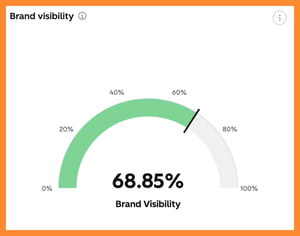
Candidate research doesn't start and end with Google. Candidates ask ChatGPT, Gemini, or Perplexity which franchises are worth owning, what they cost, and whether a Brand is legitimate. They drop your FDD into a chat. They ask AI why they should or should not invest in your Brand. They do head-to-heads with other Brands their researching. Your Brand needs to show up in those answers with accurate information, or you're invisible during a Candidate's research. HubSpot AEO helps you track and monitor how you appear there, and helps you appear more often for more relevant prompts.
- See Your Brand Visibility Score. Configure AEO with relevant prompts for your brand and measure how often your business shows up in AI answers across ChatGPT, Gemini, and Perplexity to know exactly where you stand.
- Track the Prompts That Matter. Monitor the specific questions candidates ask AI about franchising in your category, and see how your brand appears in the responses.
- Analyze Your Citations. See which domains, pages, and content types the AI engines reference. Learn what content is actually earning you a mention.
- Get Prioritized Recommendations. Turn visibility gaps into clear next steps, like creating a new blog post, updating an existing page, and even offsite opportunities like recommended YouTube videos and articles on other sites.
Customer Agent (AI chat & visitor qualification)
A Candidate lands on your site at 11pm with questions. How much capital do I need? Is my market available? What does the process look like? They can peruse your site, or the Customer Agent can drop AI-powered chat right on your site to answer questions pulled from your site pages and internal content. It can qualify and convert visitors while no one else is online. Because you provide the context, it answers only from content you approve.
- Answer Candidates 24/7. The Customer Agent engages visitors through website chat, email, and channels like WhatsApp or Facebook Messenger. It draws its answers from your pages, help docs, PDFs, and URLs.
- Keep the Agent Inside the Compliance Lines. Scope the agent to approved source content so it can't ad-lib a revenue estimate or profitability statement. Every conversation is logged on the Contact for review so you know what they were told.
- Qualify While It Talks. Configure the agent to ask your qualifying questions, score against your criteria, and sort candidates as Qualified, Partially Qualified, or Not Qualified.
- Route the Good Ones. Qualified Candidates get routed to your team for follow-up. Your Reps spend their time on the Candidates who are actually a fit.
What runs it:
| Capability | Hub / Feature |
|---|---|
| AI search visibility tracking & recommendations | Marketing Hub Pro+ or HubSpot AEO Add-on |
| AI chat & visitor qualification | Breeze Customer Agent (powered by HubSpot Credits) |
HubSpot for Franchise Sales & Development Teams
Run your whole recruitment pipeline from first inquiry to awarded Franchise Agreement. Track Brokers, applications, and Discovery Day in one system. Equip your Reps, see where Deals stall, and forecast the quarter. For a franchise sales and development team, HubSpot runs the entire recruitment motion on one platform.
Run the Franchise Sales Pipeline
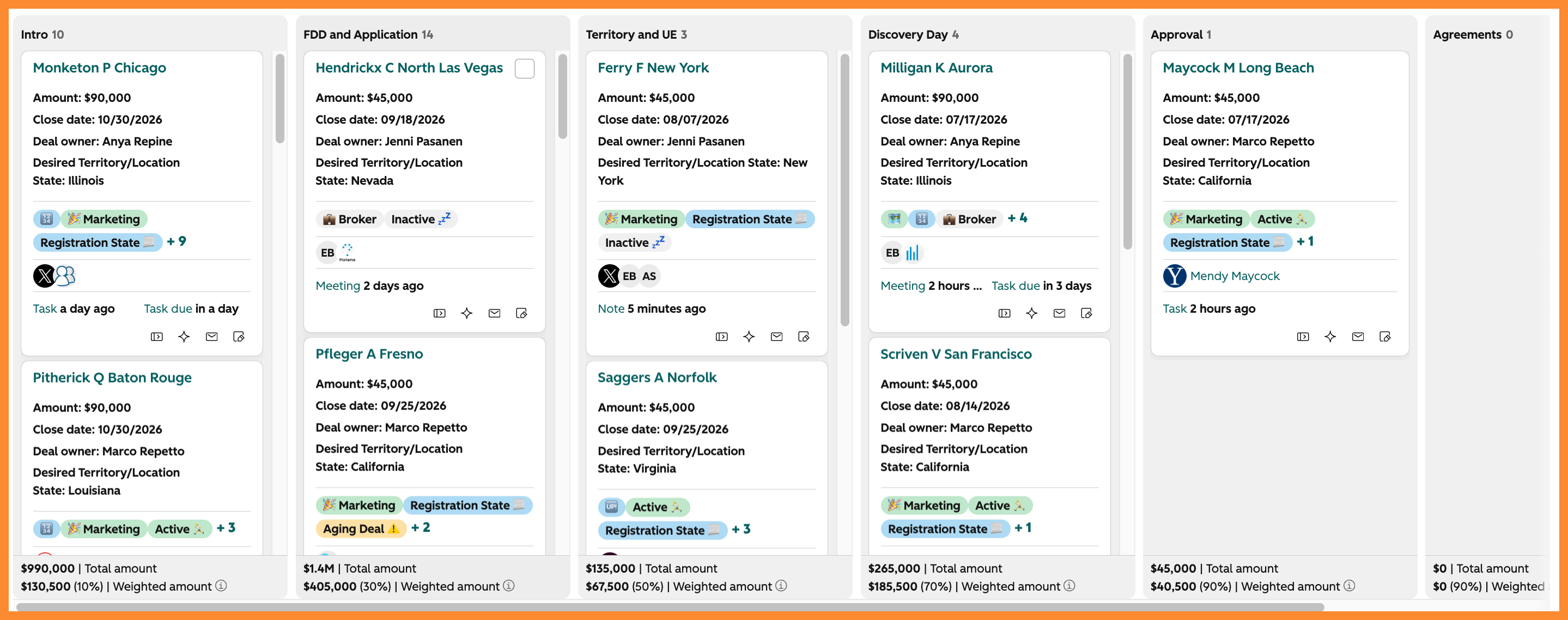
Once a Candidate clears pre-qualification you should be tracking the entire journey with a Deal record. Everything that gets them to an awarded Franchise Agreement lives on that Deal. Your Franchise Sales Reps stop tracking the real status in their heads and a side spreadsheet, and you can see exactly where every candidate stands without asking for an update.
- Run One Pipeline From Inquiry to Award. A well-defined diligence process tracked in your FranDev pipeline isn't rocket science. Well-defined stages smooth out the process, stage probabilities and forecasting make projections easier, pipeline and record views customized to surface the right data at the right time make Reps' jobs easier, and managing Close Dates helps you project when a Lead will Close. If you sell more than one Brand, each concept can run its own pipeline.
- Capture Franchise-Specific Deal Data. Use custom properties on Deal records to capture the data your franchise sales team needs. Number of Territories in play, total FA revenue, the Deal Source, whether their PFS is collected, FDD Acknowledgment status, FDD Blackout Status, etc. Lots of this data can be set and managed with automations, integrations, AI, or Call Catalyst AI.
- Require the Right Data at Each Stage. A Deal shouldn't advance until the activities and data for each stage are complete. Conditional and required properties on pipeline stages help enforce your diligence process.
Deliver the FDD and Run the Cooling-Off Clock
Disclosure is the compliance-critical moment of your entire sales process, and most Brands already deliver the FDD through an eSigning platform. The gap is what happens next: the signed receipt and its date stay in the eSignature tool. The 14-day clock ends up in a Rep's head or a calendar reminder. You should run delivery, receipt, and the cooling-off window on the Deal itself
- Sync the Item 23 Receipt Into HubSpot. Connect your eSignature platform, like DocuSign or PandaDoc, to HubSpot so the signed receipt and its signature date log to the Deal automatically. The acknowledgement that regulators and your franchise counsel care about is timestamped on the record, not sitting in a separate tool.
- Autocalculate the Cooling-Off Window. The FDD Acknowledgment date drives a calculated property marking the end of the 14-day cooling-off period, visible right on the Deal. Track FDD acknowledgement status and (during that time of year) FDD Blackout status alongside it, so everyone can see at a glance which Deals are cleared to proceed.
- Make the Clock a Gate, Not a Suggestion. Use required properties and stage conditions so a Deal can't advance to signing while the window is open, and automate an alert to the Rep the day a Candidate clears. Compliance stops depending on memory and the Deal moves the moment it legally can.
Manage Brokers
You have Candidates come through Brokers, and those Brokers want to know how their referral is moving without emailing your team for a status. You want to know which Brokers and Networks bring you great leads.
- Track Broker Deals and Attribution. Flag Broker Deals and associate each to the referring Broker and Network records. Now you can report on how many awarded FAs each Broker sourced and what commission is owed, instead of reconstructing it in spreadsheets.
- Automate Broker Updates. Automate messages to a Broker when their Candidate's Deal advances stages so Brokers don't feel ghosted and Reps are freed up from admin work.
- See Broker Performance. A solid setup lets you report on Deals, Close Rates, and Revenue by Broker and Network to know which relationships are producing Franchisees.
Qualify with Franchise Applications
If your process includes an Application, at some point a serious Candidate submits a formal application. It carries the data your approval decision rests on: financials, background, entity structure, funding path. That critical data belongs on an Application record, not crammed on some other object or worse, in an external form tool where you have to match up records..
- Collect Applications on a Custom Object. A dedicated Franchise Application object holds each submission with its own properties and pipeline, associated to the Candidate's Contact and Deal. Your team works applications through their own stages without cluttering the sales pipeline.
- Use a Custom Application Form. The Form Builder lets you run the entire application process directly in HubSpot without a third-party form tool, integration, or spreadsheet.
Track Discovery Day Attendance
Discovery Day is the culmination of your recruitment process and the Candidates who make it there are your closest to award. Yet registration often lives in an email thread, external system, or spreadsheets that make tracking and automation clunky at best. Attendance never makes it back to the Deal so you have reporting gaps.
- Track Registration and Attendance. Use built-in Marketing Events to track registration and attendance tied back to the Candidate's Contact and Deal, or level up to a fully integrated event management platform.
- Automate the Run-Up. Trigger confirmation and reminder emails on registration and update the Deal when a Candidate attends, so the pipeline reflects reality without manual entry.
What runs it:
| Capability | Hub / Feature |
|---|---|
| Deal pipeline, stages, custom properties | Sales Hub |
| Stage probabilities & forecasting | Sales Hub |
| Conditional / required stage properties | Sales Hub Pro |
| Item 23 receipt & signature-date sync | eSignature integration (DocuSign / PandaDoc) |
| FDD cooling-off Calculated Property | Any Pro |
| Cooling-off stage gate & clearance alerts and automations | Any Pro |
| Automated broker updates using Workflows | Any Pro, Transaction Email Add-On recommended |
| Franchise Application (custom object + pipeline) | Any Enterprise |
| Application form | Marketing Hub |
| Discovery Day attendance | Marketing Events or integrated event platform |
| Call Catalyst AI features | Call Catalyst AI by FranDev Lab |
Guide Reps With Sequences and Playbooks
Your Reps run the same plays over and over: the outreach after an inquiry, the follow-up after Discovery Day, the questions on a qualification call. You should give them tools so those plays stay consistent instead of getting reinvented by every Rep.
- Automate 1:1 Outreach With Sequences. Sequences send a Rep's personal follow-ups on a schedule and stop the moment a Candidate replies or books a meeting, freeing up the time and memory.
- Standardize Calls With Playbooks. Playbooks put your qualification questions and talking points front and center during a call and can capture the answers as structured data. Every Rep runs Discovery the same way, and the notes are data you can report on, not freeform text.
Manage Meetings
Getting a qualified Candidate on the calendar shouldn't take five emails. HubSpot Meetings lets a Candidate book straight into a Rep's calendar and logs the meeting on the Deal.
- Let Candidates Book Themselves. Share a scheduling link so a Candidate picks a time synced to your Rep's real availability, with no back-and-forth.
- Track Meeting Outcomes. Log whether a meeting completed, rescheduled, or was a no-show right on the record, so the pipeline reflects real engagement.
Analyze Every Call and Update HubSpot With Call Catalyst AI
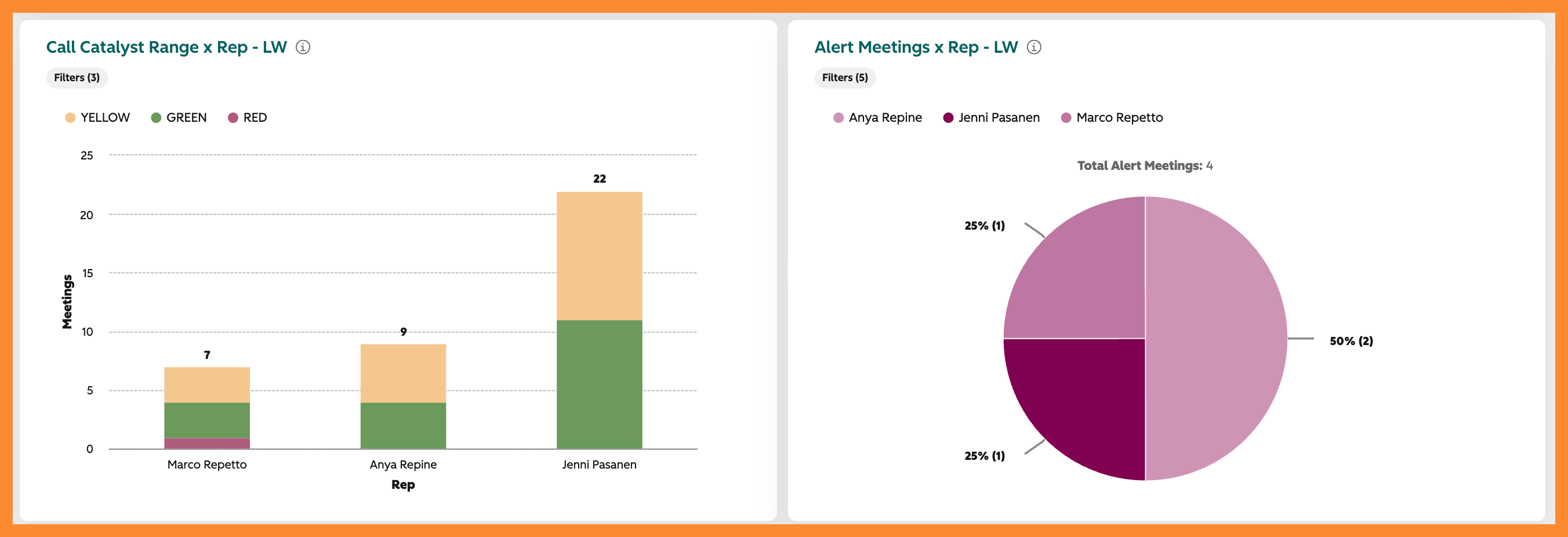
Generic “AI” notetakers are not well suited for Franchise Development. Their build for B2B or software companies. They don’t understand the franchise diligence process, they don’t monitor for compliance, and they don’t know what a good call looks like. Call Catalyst AI review franchise sales calls for you and updates the CRM.
- Extract and Update in the Background. Call Catalyst listens to sales calls, writes structured notes, and updates the Deal's data automatically, so Reps stop doing call admin and the CRM stays current on its own.
- Score Every Call for Excellence. Each call gets a meeting excellence score, so Directors coach from real numbers instead of spot-checking a handful of recordings.
- Flag Compliance Risks. Call Catalyst flags language that crosses franchise sales' regulatory lines, so a problem surfaces the day it happens, not in a dispute two years later.
What runs it:
| Capability | Hub / Feature |
|---|---|
| Sequences (1:1 rep outreach) | Sales Hub Pro |
| Playbooks (guided call cards) | Sales Hub Pro |
| Meeting scheduling & outcomes | All Tiers Group and Round Robin require Sales Hub Pro+ |
| Call Catalyst AI features | Call Catalyst by FranDev Lab |
See Where Deals Stall and Die
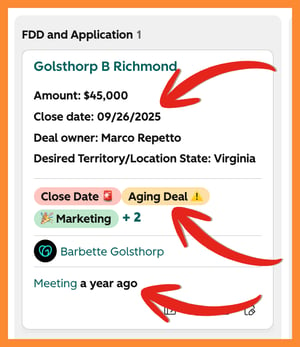
Some Deals sail through and some sit in a stage for months before they quietly die. You should be able to see where the process bogs down and why Candidates drop, so you fix the stage instead of guessing at the quarter.
- Spot Slow and Stalled Deals. Time-in-stage and deal velocity reports show where Deals bog down, and stage calculated properties surface Deals sitting untouched too long. Your Director sees that the FDD stage is where Candidates stall, not just that the quarter is soft.
- Standardize Closed-Lost Categories. Give Reps a fixed set of Closed-Lost Categories instead of freeform text so you can report and analyze the reasons you lose qualified leads, stage-by-stage.
- Watch Conversion Stage to Stage. Deal funnel reports show your conversion rate between stages, so you know whether the leak is at qualification, FDD, Territory, Discovery Day, or Approval.
Report on Performance
A Rep should see their own pipeline and a Director should see the whole team, without either one building a report from scratch.
- Give Reps Their Own Dashboard. Each Rep sees their Deals, activities, and Close Dates in one view so they manage their own pipeline.
- Give Leaders the Full Picture. A sales-leader dashboard rolls up the team: pipeline created, Deals by stage, and who is on pace, so coaching starts from data.
Track FAs and Revenue Against Goals
"Are we going to hit our numbers" shouldn't be a gut feel. Set your FranDev goals in HubSpot and track against them in real time.
- Set Goals for FAs and Revenue. Use the Goals tool to target awarded FAs, new Territories, and franchise-fee revenue by Rep and team, then track pace against target automatically.
- Forecast the Quarter. Stage probabilities and forecasting project where you'll land, so a shortfall shows up with time to act, not at quarter close.
What runs it:
| Capability | Hub / Feature |
|---|---|
| Time-in-stage, velocity, stalled deals | Sales Hub, Pro+ recommended |
| Deal funnel / stage conversion | Sales Hub, Pro+ recommended |
| Closed-Lost Category property | Smart CRM |
| Rep & leader dashboards | Sales Hub |
| Goals (FAs, Territories, revenue) | Sales Hub Pro |
| Forecasting | Sales Hub Pro |
HubSpot for Location & Territory Development
Track every Territory and Location on its own record, from available market to open unit to closed. Connect each one to the Owner and Owner Group that runs it. Manage the whole build-and-launch as a project, with the pipeline, automation, and data in one place. For your development team, HubSpot is the single source of truth for where every unit stands.
Track Location & Territory Data
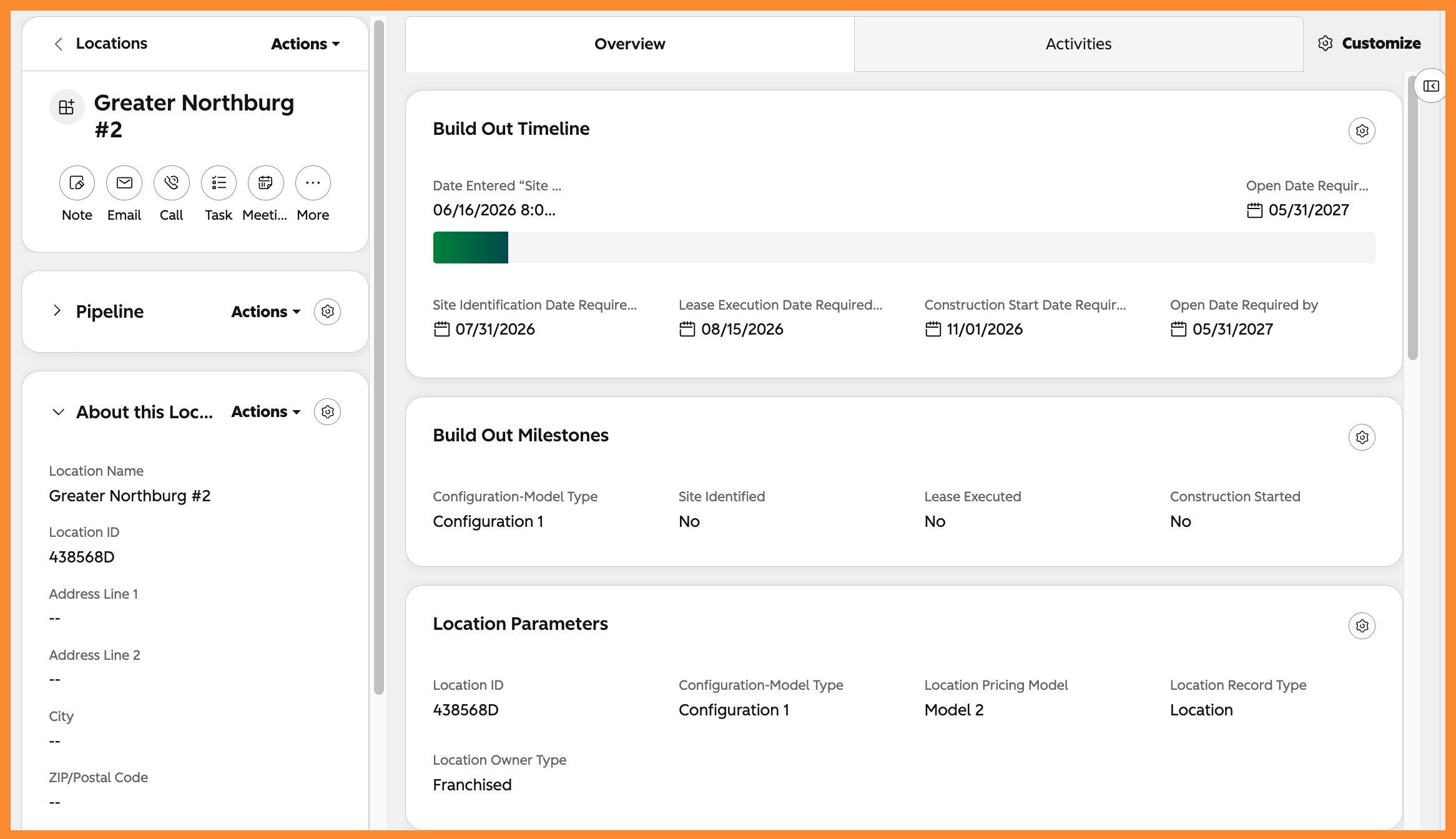
Your Territories and Locations are the core of your system and they should be connected to the performance, communication, and history of the relationship with the Owners. Give every Territory and Location its own record so the data has a home and a history.
- Give Every Territory and Location a Record. A custom Location object holds each Territory and unit with its own properties: address, market, status, open date, and an association to the Owner and Owner Group legal entity. Now "which Territories are open in Texas" is a filter, not a count.
- Track the Full Lifecycle on One Object. Move a Location from available to in-development to open to closed on the same record, so its history stays intact instead of scattering across tools every time its status changes.
Associate Owners and Owner Groups to the Locations They Operate
A single Owner Group might run six Locations across two States, and one individual might have interest in multiple locations with different buyer groups and entities. These relationships are hard to track in your head or spreadsheets but not in HubSpot.
- Link Owners, Owner Groups, and Locations. Associate each Location to the Owner Group that owns it and the Owner who operates it. Opening an Owner Group shows every Location they run, and opening a Location shows exactly who is responsible.
- Label the Relationship. Association labels distinguish the owner from the operator from the manager, so a Company tied to a Location is not just "related" but clearly the Operating Entity or the Franchisee of Record.
Run the Open & Launch Process
Signing the FA is the start, not the finish. Getting a Location from signed to grand opening runs through different stages depending on your model: site selection, lease, buildout, and training. You can track and run this process in HubSpot or use a native integration to pass data into HubSpot for status reporting and history.
- Run Launch as a Pipeline. A development pipeline moves each new Location from signed through site, lease, buildout, and open, so your team sees every unit in flight and exactly where it's stuck.
- Give the Owner a Guided Plan With Arrows. Arrows gives each new Owner a shared, customer-facing launch plan with their tasks and yours, embedded scheduling and documents, and syncs progress back to HubSpot so your team sees where every launch stands without chasing an update.
- Automate the Handoffs. Automate the tasks and notifications that move a launch forward, so a completed lease kicks off the buildout checklist and your field team knows a unit is ready for training.
What runs it:
| Capability | Hub / Feature |
|---|---|
| Custom Location/Territory object + lifecycle | Enterprise |
| Association labels (owner vs. operator) | Any Pro+ |
| Location Pipeline | Enterprise |
| Guided owner launch plan | Arrows (integration) |
HubSpot for Transfers & Resale
Manage every ownership Transfer the same way you manage recruitment, with the resale anchored to the Location changing hands and the Owner selling it. Bring buyer leads in from Owners, your Brand, and resale portals. Vet the buyer, run the approval, and keep both sides informed. For your team, a Transfer runs on the same platform as a new sale, plus the pieces recruitment doesn't have.
Run the Resale Pipeline
A Transfer runs like a franchise sale with one difference that changes everything: there's an existing Location and an existing Owner on the other side of the table. If you handle Transfers internally you should run each Transfer as a Deal in its own resale pipeline, anchored to the unit changing hands and the Owner selling it.
- Run Each Transfer as a Deal. A dedicated resale pipeline moves each Transfer from prospective buyer through approval to close, so an in-flight resale never gets tracked like a new sale or buried in the recruitment pipeline. The same Reps, Sequences, and Playbooks you use for recruitment apply here.
- Anchor the Deal to the Location and Seller. Associate each resale Deal to the Location being sold and the current Owner, so the Transfer carries the unit's history and everyone knows which Owner is exiting.
Capture Buyer Leads From Every Source
Buyers for an existing unit come from places a new-franchise inquiry never does. The selling Owner often brings their own buyer, your Brand markets the opportunity, and resale portals like BizBuySell send interested operators. You should funnel all of them into HubSpot.
- Bring in Buyers From Every Channel. Whether a buyer is sourced by the selling Owner, your Brand's marketing, or a portal like BizBuySell, capture them as a Contact on the Transfer Deal with the Lead Source recorded.
- See Which Channels Produce Transfers. With Lead Source on every resale Deal, you can tell whether Owner-sourced buyers or portal leads actually close, and where the good resale leads come from.
Vet Buyers With a Resale Application
A buyer taking over an existing unit still has to qualify, sometimes to a higher bar than a greenfield Candidate because they're inheriting an operating business. If your process includes an application, a Resale Application streamlines the process of vetting the incoming buyer.
- Qualify the Buyer on Its Own Object. A Resale Application collects the buyer's financials, background, and funding on a dedicated object associated to the Transfer, retaining all critical data.
- Standardize the Process. Create a custom pipeline for the Resale Application to capture, automate, and report on the process of reviewing and approving buyers.
- Reuse Your Application Setup. A Resale Application mirrors the Franchise Application you may already run for recruitment, so vetting stays familiar to your team and consistent across new sales and Transfers.
Manage the Transfer & Seller Side
- Record the Transfer Fee. Using a Deal Pipeline for Transfers lets you treat the Transfer Fee like revenue so it shows in your reporting in HubSpot.
- Keep the Seller Informed. Automate updates to the exiting Owner as their Transfer advances, so a seller waiting on approval isn't left guessing.
What runs it:
| Capability | Hub / Feature |
|---|---|
| Resale pipeline | Sales Hub |
| Resale Application (custom object) | Enterprise |
| Seller update automation | Any Pro+ |
| Rep tools (Sequences, Playbooks, Meetings) | Sales Hub Pro |
HubSpot for Franchisee & Owner Group Management
Keep every Owner, Owner Group, and the Locations they run in one connected system. Track the managers and key people at each unit. Communicate with Owners from the same place their records live, and log the coaching and field support they receive. For your field and support teams, HubSpot is the operating record for the franchisees you already have.
Manage Owners & Owner Groups
Once a Candidate becomes an Owner, their history shouldn’t be lost. They become the relationship you manage for the next ten years. End-to-end history for Owner Contacts and Companies can be centralized in HubSpot for total context.
- Keep Owners and Owner Groups as Records. Track each Owner as a Contact and each Owner Group as a Company, with the demographics, entity details, and status your team relies on. The relationship that started with an inquiry form keeps its full history.
- Put the Right Data in the Right Place. Owner-level data on the Contact, entity and group data on the Company records, associated to the Locations/Territories they operate. No gaps, no guessing or remembering.
See Every Location an Owner Operates
Your multi-unit Owners are your most valuable relationships and your most complex. An Owner Group running eight units across two Brands should show all of it in one place. You should be able to open an Owner Group and see their entire portfolio, not piece it together.
- See an Owner's Whole Portfolio. Opening an Owner Group shows every unit they run and its status in one view, so a field visit or a renewal conversation starts from the full picture.
See Unit Performance Next to the Relationship
Your Owners' performance numbers live in an external system and the relationship lives in HubSpot. That fine, but your field team works both, in two tabs, and neither system shows the whole Owner story. You should bring key performance data onto the Location and Owner Group records, so the numbers and the relationship history sit side by side and you can easily segment Owners and Locations.
- Sync Performance Data Onto the Record. Integrate your royalty or POS system so key metrics land on each Location and roll up to the Owner Group. You don’t need every metric or every transaction pulled into HubSpot, just the KPIs you coach on month-to-month: gross sales, bookings, speed to lead, etc. The data can update on a schedule instead of someone pasting numbers into a spreadsheet before every review.
- Coach From the Full Picture. A Franchise Business Coaches preparing a business review opens one record and sees the unit's performance trend next to the full support history. The conversation starts from what's actually happening, not from whatever the Owner volunteers. And the meeting record with notes is stored on the records for future review or reference.
Track Critical Employees
An Owner Group is not just the Owner. The General Manager who actually runs the unit, the multi-unit operator's director of ops, the bookkeeper who handles royalty payments, these are the people your field team works with day to day. You should track the key people at each Location, not just the Owner who signed.
- Track Managers and Key Staff. Associate the General Manager and other critical people to their Location and Owner Group as Contacts, with association labels for their role. Now your field coach knows exactly who runs the unit, and a manager change doesn't erase the relationship.
Manage Owner Communications
Your existing Owners need to hear from you: system updates, new programs, LTO announcements, compliance reminders. Today those often go out from a bulk-email tool that doesn't know who owns what. You should send them from the same system that holds their records, so every message is targeted and logged.
- Email Owners From the CRM. Send program rollouts and announcements to Owners with marketing email, segmented by Brand, Territory, or Owner Group. Every send is logged on the record, so you can see it was sent and who opened what.
- Segment Who Gets What. Use lists to reach the right Owners: a compliance notice to a single Registration State, an LTO kit to one Brand, a renewal reminder to Owners inside their window.
Track Business/Franchise Coach Activity with Owners
Your field coaches are the relationship, but their work often lives in a personal notebook and a shared calendar. You should log every coaching touch and business review on the Owner's record, so the whole team can see who's supported and who's gone quiet.
- Log Every Coaching Touch. Record calls, visits, and business reviews as activities on the Owner Group, so the next coach or the VP sees the full support history at a glance.
- See Who's Overdue for Attention. With coaching activity on the record, you can report on which Owners haven't had a touch in 90 days and which coaches are keeping cadence.
Reporting, Compliance & Agreements
Pull the whole franchisor operation into one set of dashboards. Keep the Owner, Location, and Agreement data that annual FDD reporting depends on clean and ready. Track every Agreement's key dates and terms and automate around them. For your executives, legal, and finance teams, HubSpot turns clean day-to-day data into the reporting and compliance backbone the whole system runs on.
Report Across the Operation
Every division above has been putting its work into one system, which means your leadership can see the operation without stitching together five data sources. You should give executives and each team the dashboards that turn all that data into answers.
- Give Executives One View. An executive dashboard rolls up recruitment, development, and owner health in one place, so leadership sees new FAs, units in buildout, and system size without asking three departments for numbers.
- Give Every Team Its Own Dashboard. Marketing, sales, development, and field support each get a dashboard built on the same shared data, so everyone works from one source of truth instead of competing spreadsheets.
Collect and Track Data for FDD Reporting
Every year the FDD comes due, and if your Owner, Location, and Agreement data is scattered, assembling it is a fire drill. When that data lives in HubSpot and stays current, the numbers your FDD needs are already there.
- Keep Item 19 and Item 20 Data Ready. The unit counts behind Item 20, openings, closures, and Transfers, and the performance data behind Item 19 come straight from your Location and Deal records, so the annual pull is a report, not a reconstruction.
- Generate the Franchisee List. Your roster of Owners and units for the FDD exhibit builds from live records, so it's accurate as of the day you pull it.
Track, Surface, and Automate Critical Agreement Dimensions
Your Franchise Agreements carry dates and terms that matter enormously and get forgotten easily: renewal windows, expirations, development schedules, registration status. You should hold every Agreement as its own record so those dates surface before they become problems.
- Store Every Agreement as a Record. A custom Agreements object holds each Franchise Agreement with its status, key dates, fees, and the Owner Group and Locations it covers, so the terms live in the system, not a filing cabinet.
- Surface What's Coming Due. Report on Agreements approaching renewal or expiration, and the development schedules an Area Developer owes, so nothing important falls through the cracks.
- Automate the Reminders. Automate alerts as a renewal window or a development milestone approaches, so the right person acts while there's still time.
Keep the Data Clean
Every dashboard, every FDD pull, every Agreement alert depends on one thing: the underlying data being trustworthy. Clean data isn't glamorous, but it's the foundation the whole platform stands on. You should treat hygiene as ongoing work, not a one-time setup.
- Maintain CRM Hygiene. Deduplicate records, standardize key fields, and monitor data health so the reports your leadership trusts stay trustworthy.
- Fix Problems at the Source. Surface bounced emails, disconnected integrations, and missing required data so issues get fixed before they quietly corrupt a report.
What runs it:
| Capability | Hub / Feature |
|---|---|
| Executive & team dashboards | Sales / Marketing Hub |
| Cross-team custom reports | Any Pro+ |
| FDD data (Item 19 / 20, franchisee list) | Location & Deal records + reports |
| Agreements object (status, dates, terms) | Enterprise |
| Renewal / expiration automation & alerts | Any Pro+ |
| Data hygiene monitoring | Smart CRM / Data Hub |
What Else Can HubSpot Do?
And this isn't even everything HubSpot can do for your franchise. What you just read is what good looks like, not the full reach of the platform, and almost no franchisor is running all of it yet.
One honest thing before you start: HubSpot won't fix a broken process or a broken system for you. It automates whatever you give it, so pointed at a mess, it just makes the mess run faster. If all of this feels like a lot, it is, and that's exactly why we're here.